HOW TO CREATE EV Mobile Outwards / EV Mobile Inwards
HINDI VIDEO TUTORIAL:- HOW TO CREATE EV Mobile Outwards / EV Mobile Inwards
Complete Process Flow (Simple Understanding)
- EV Mobile Outward → Service van leaves workshop
- On-site Service → Repair done at customer location
- EV Mobile Inward → Service van returns to workshop
STEP 1: EV Mobile Outward (Service Van Going Out)
Overview
This process is used when:
- A vehicle breaks down on road
- Service team goes to customer location
- Work is done outside workshop
Navigation Path
Go to:
Electric Vehicle Module → Service → Gate Pass → EV Mobile Outward → New
How to Fill Details (Simple Explanation)
| Field | What to Do |
|---|---|
| Service Van | Select the service van used |
| Check Out Date & Time | Enter or verify departure time |
| Driver | Enter driver/technician name |
| From | Select starting location (branch) |
| To | Enter destination (customer location) |
| Starting KM | Enter current KM of service van |
| Vehicle | Select customer vehicle |
| Frame No | Enter vehicle chassis/frame number |
| Model Code | Select model code |
| Model Name | Select model name |
| Customer Code | Select customer code |
| Customer Name | Select customer name |
| Address | Enter/verify service location |
✅ Important Points
- Always enter correct starting KM (important for billing)
- Ensure customer details are accurate
- Mention exact location in “To” field
- Confirm correct vehicle selection
🔧 What Happens Next?
- Service team goes to location
- Work/inspection is done
- Travel distance will be used for billing
🔁 STEP 2: EV Mobile Inward (Service Van Return)
Overview
This process is used when:
- Service work is completed
- Service van returns to workshop
- Final KM is recorded for billing
Navigation Path
Go to:
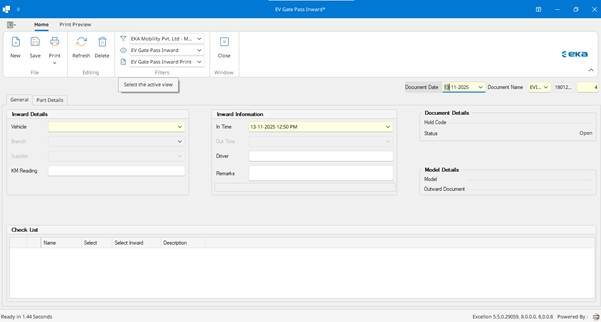
Electric Vehicle Module → Service → Gate Pass → EV Mobile Inward → New
📝 How to Fill Details
| Field | What to Do |
|---|---|
| Outward Document | Select the related outward entry |
| Van | Auto-filled from outward |
| Check-Out Date & Time | Auto/verify from outward |
| Check-In Date & Time | Enter return time |
| From | Auto/verify starting location |
| To | Auto/verify destination |
| Starting KM | Auto-filled |
| Ending KM | Enter final KM of van |
| Vehicle | Auto-filled |
| Frame No | Verify or enter |
| Model Code | Verify |
| Model Name | Verify |
| Customer Code | Verify |
| Customer Name | Verify |
| Address | Verify service location |
✅ Important Points
- Always select correct Outward Document
- Enter accurate Ending KM
- Check difference between starting & ending KM
- Verify customer & vehicle details
⚠️ Common Mistakes to Avoid
- ❌ Wrong service van selection
- ❌ Missing starting KM
- ❌ Not entering ending KM
- ❌ Incorrect customer details
- ❌ Not selecting outward document in inward
✅ Best Practices
✔ Always record KM readings correctly
✔ Ensure proper customer location entry
✔ Verify all auto-filled data during inward
✔ Maintain proper timestamps
✔ Use remarks (if available) for service details
Simple Example (Real-Life Flow)
- Customer calls for breakdown
- Create Mobile Outward → Van leaves workshop
- Technician repairs at site
- Van returns → Create Mobile Inward
- KM difference used for billing
KM Calculation Example
| Detail | Value |
|---|---|
| Starting KM | 10,000 |
| Ending KM | 10,050 |
| Total Distance | 50 KM |
➡️ This distance is used for service charges calculation
Final Summary
| Step | Document | Purpose |
|---|---|---|
| 1 | Mobile Outward | Van goes for service |
| 2 | Service Activity | Work done at location |
| 3 | Mobile Inward | Van returns & KM recorded |
Related Articles
HOW TO CREATE EV GatePass Outwards / EV GatePass Inwards
HINDI VIDEO TUTORIAL:- HOW TO CREATE EV GatePass Outwards / EV GatePass Inwards EV Gatepass Outward (Vehicle Going Outside) Overview This document is created when: Vehicle goes outside for repair/job work Parts/spares are sent along with vehicle This ...HOW TO CREATE EV Work Purchase Orders and EV Work Purchase Order Invoices
HINDI VIDEO TUTORIAL:- EV Work Purchase Orders and EV Work Purchase Order Invoices Work Purchase Order Process Flow OVERVIEW This document outlines the step-by-step process for creating and managing Work Purchase Orders (WPO) in the system, from Job ...HOW TO CREATE EV QUOTES
HINDI VIDEO TUTORIAL:- HOW TO CREATE EV QUOTES OVERVIEW: EV Quotes EV Quotes process records the interest of a customer in one or more models. Enquiry for models is obtained by various sources such as reference, telephone, e-mail, SMS. An enquiry ...HOW TO CREATE EV LEAD
Hindi Video Tutorial - HOW TO CREATE EV LEAD OVERVIEW EV Leads process records the interest of a customer in one or more models. Enquiry for models is obtained by various sources such as reference, telephone, e-mail, SMS. An enquiry process captures ...HOW TO CREATE EV SERVICE REMINDER
Hindi Video Tutorial -EV SERVICE REMINDER OVERVIEW EV SERVICE REMINDER Service Reminder keeps a record of service performed on a vehicle and reminds customers of upcoming services. It supports SMS / Email. Reminder frequency: 15 days for 1st, 7 days ...